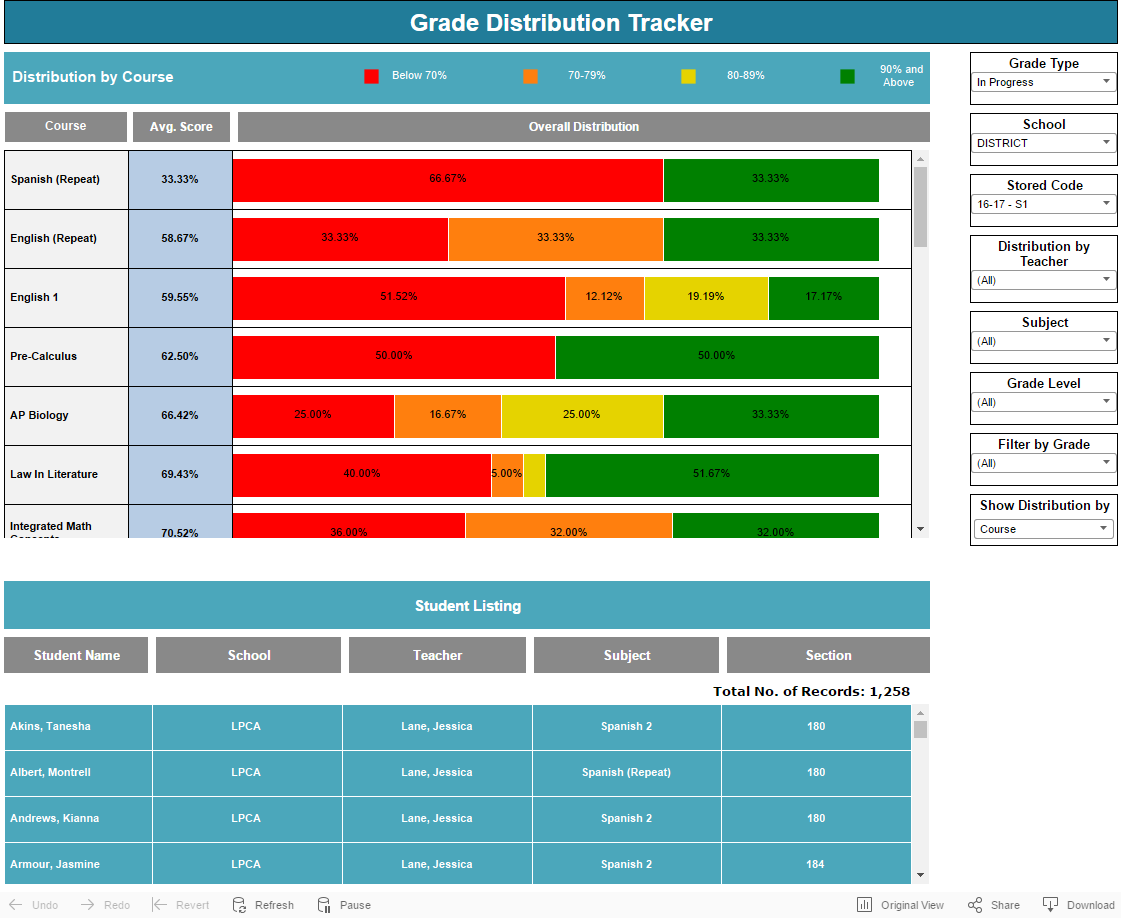
This dashboard helps you understand how grades are distributed in each courses and sections, along with the overall average percentage.
Dashboard
- Main Area: This section shows the average score and grades distribution.
- Filters: You can select filters to narrow down your results.
- Student Listing: List of student names.
Filters:
- Grade Type:
- In-Progress: Shows grades from teacher's gradebook
- Historical: Shows grades from historical table.
- School:
- District: Shows results for all the schools
- School: Shows results for selected school.
- Store Code:
- Based on your Grade Type filter, the options you will see in this filter will vary. By default, the results are based on all the terms but choose a specific term to get the correct result. For example "16-17 S2" will give you results for only 16-17 S2 term.
- Teacher:
- View the result by All teachers or select a specific teacher.
- Subject:
- View the result by All subjects or select a specific subject.
- Grade Level:
- View by All grade levels or select a specific grade level.
- Grade:
- View by All letter grades or select a specific letter grade.
- Group by Course Name or Section:
- You can group the results based on course names or by sections.
Main Area:
- Courses:
- The courses/sections are sorted by the lowest average score on the top.
- Overall Distribution:
- Each bar represents the distribution % for the letter grade.
- Hover or Click:
- You can hover over or click on any of the sub section to narrow down your results.
Student Listing:
- Student Names:
- View the student names based on your selected filters.
- Total Records:
- Shows the total unique counts.
- Hover Over student names:
- Tool Tip: Shows student detailed information such as course name, teacher name, percentage and letter grades.
- Click on "View Student PS Info" - Takes you to PowerSchool directly to student grade information.
How to get Course Average for each Section?
- Select the filters from the right hand side
- The Avg. Score column shows the average score for each course.
Example: See the screenshot below to get the average scores for 16-17 2nd semester for Baclig, LaShawn:

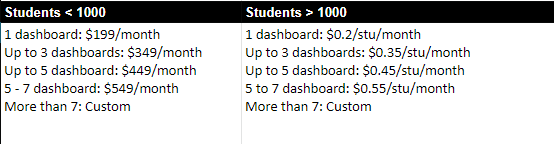
Pricing: