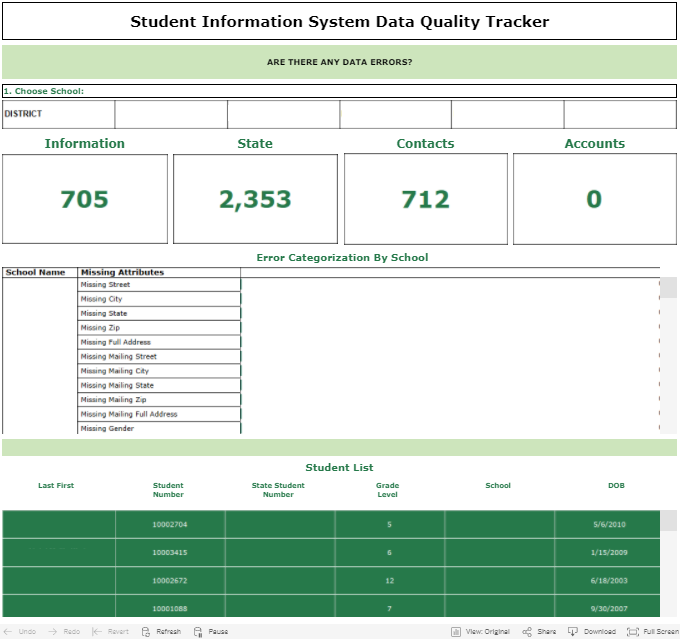
The Data Quality Tracker Dashboard proactively monitors your data to identify any errors in your systems.
- Helps you and your operations team find and fix incomplete, unreliable and unidentified data points.
- Builds trust with your data.
- Proactively monitor for 100% accurate information.
This dashboard helps you identify errors in PowerSchool such as missing information, duplicates and state related issues.
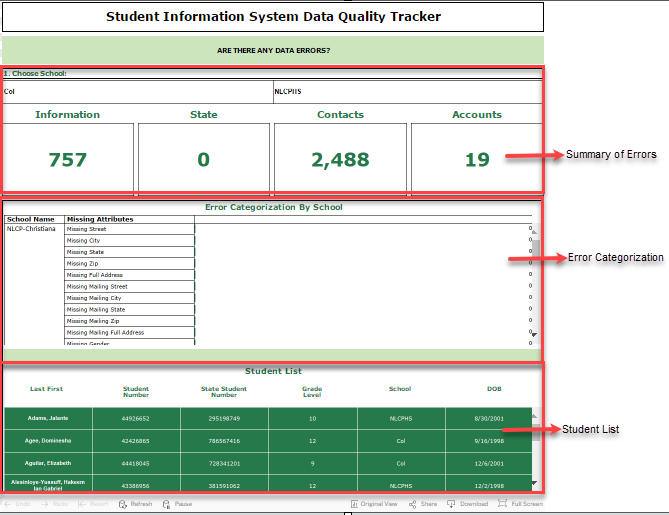
Dashboard
- Main Area: This section shows the Summary of Errors and Error Categorization
- Filters: You can select filters to narrow down your results.
- Student Listing: List of student names and student information such as Student Number, State Student Number, Grade Level, School and Date of Birth.
Filters:
- School: Select the entire district or specific school.
- Information: Select the Demographic information of the stundent(s) (Missing Address, Mailing Address, Missing Date of Birth, Missing Student Number, Missing Photo, etc)
- State: Select the Missing State Number / Duplicate State Number
- Contacts: Select the Missing Parent / Guardian Information (Missing Parent / Guardian's name, Contact information, Missing Doctor's name and contact information)
- Accounts: Select the Missing Account information such as access permission, student web ID and password.
_________________________________________________________________________
How to extract errors /missing information?
- Choose the school /district where to extract the errors / missing information.

- Select the proper filter where to extract the errors/ missing information.

- Student information will appear under Student Listing

- Hover the mouse pointer to the Student ID to be directed to the student information in PowerSchool. (Note: You should be logged in to PowerSchool to be directed correctly to the student information)

- Correct /Fill out the missing information

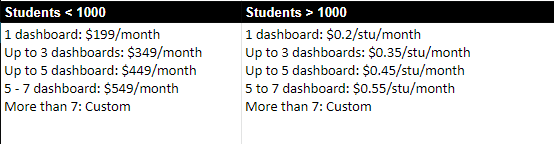
Pricing: